
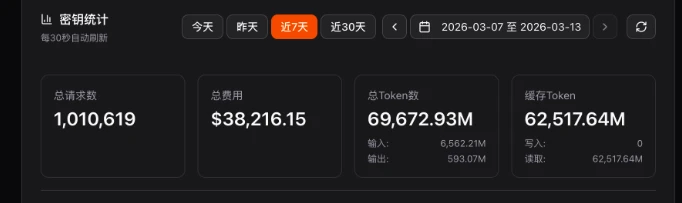
状态检测:https://status.jlypx.de/
新的站点地址:https://sub.jlypx.de/
baseurl填:https://sub.jlypx.de/ 或者 https://sub.jlypx.de/v1 (v1可带可不带,都兼容)
或者
https://betterclau.de/openai/sub.jlypx.de/v1 (有cf优选,注意这个链接必须带v1)
直接使用邮箱注册即可(邮件可能比较慢,但是一般是能到的),注册后会自动赠送free号池使用权限,不用管余额等信息,直接创建key选择free号池的套餐即可

有默认5并发的限制,一般来说足够大家使用了
不知道如何使用的朋友可以点击所创建的key的右侧的“使用密钥”按钮来学习如何使用
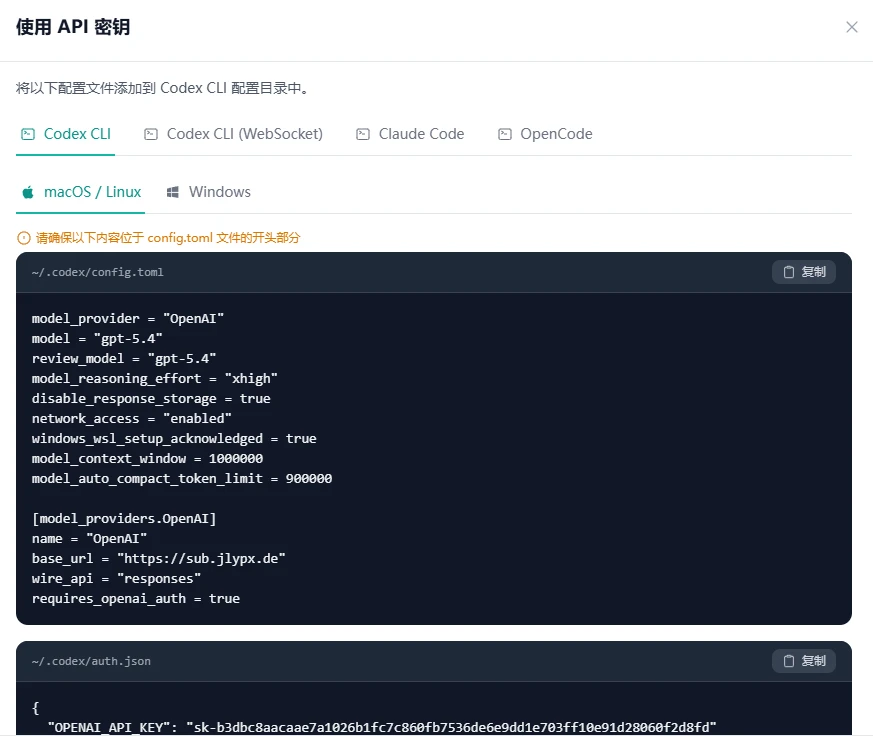
已支持codex在cc中使用
已支持websocket的调用
codex配置方法:
在~/.codex/auth.json 填入以下内容:
{
  "OPENAI_API_KEY": "sk-2782dbe8ece26caf88c7ad8e4610a88d"
}
在~/.codex/config.toml 填入以下内容:
model_provider = "custom"
model = "gpt-5.4"
model_reasoning_effort = "high"
disable_response_storage = true
personality = "pragmatic"

[model_providers.custom]
name = "custom"
wire_api = "responses"
requires_openai_auth = true
base_url = "https://betterclau.de/openai/cch.jlypx.de/v1"
opencode参考配置:
"free-GPT": {
      "npm": "@ai-sdk/openai",
      "name": "free-GPT",
      "options": {
        "baseURL": "https://betterclau.de/openai/cch.jlypx.de/v1",
        "apiKey": "sk-2782dbe8ece26caf88c7ad8e4610a88d"
      },
      "models": {
        "gpt-5.3-codex": {
          "name": "GPT-5.3 Codex",
          "attachment": true,
          "reasoning": true,
          "tool_call": true,
          "temperature": false,
          "cost": {
            "input": 1.75,
            "output": 14,
            "cache_read": 0.175
          },
          "limit": {
            "context": 272000,
            "output": 128000
          },
          "options": {
            "store": false,
            "reasoningEffort": "high",
            "textVerbosity": "medium",
            "reasoningSummary": "auto",
            "promptCacheKey": "opencode-stable-user",
            "include": [
              "reasoning.encrypted_content"
            ]
          },
          "variants": {
            "xhigh": {
              "reasoningEffort": "xhigh",
              "textVerbosity": "medium",
              "reasoningSummary": "detailed"
            },
            "high": {
              "reasoningEffort": "high",
              "textVerbosity": "medium",
              "reasoningSummary": "detailed"
            },
            "medium": {
              "reasoningEffort": "medium",
              "textVerbosity": "medium",
              "reasoningSummary": "auto"
            },
            "low": {
              "reasoningEffort": "low",
              "textVerbosity": "medium",
              "reasoningSummary": "auto"
            }
          },
          "headers": {
            "x-session-id": "opencode-stable-user",
            "conversation_id": "opencode-stable-user",
            "session_id": "opencode-stable-user"
          }
        },
        "gpt-5.2": {
          "name": "GPT-5.2",
          "attachment": true,
          "reasoning": true,
          "tool_call": true,
          "temperature": false,
          "cost": {
            "input": 1.75,
            "output": 14,
            "cache_read": 0.175
          },
          "limit": {
            "context": 272000,
            "output": 128000
          },
          "options": {
            "store": false,
            "reasoningEffort": "high",
            "textVerbosity": "medium",
            "reasoningSummary": "auto",
            "promptCacheKey": "opencode-stable-user",
            "include": [
              "reasoning.encrypted_content"
            ]
          },
          "variants": {
            "xhigh": {
              "reasoningEffort": "xhigh",
              "textVerbosity": "medium",
              "reasoningSummary": "auto"
            },
            "high": {
              "reasoningEffort": "high",
              "textVerbosity": "medium",
              "reasoningSummary": "auto"
            },
            "medium": {
              "reasoningEffort": "medium",
              "textVerbosity": "medium",
              "reasoningSummary": "auto"
            },
            "low": {
              "reasoningEffort": "low",
              "textVerbosity": "medium",
              "reasoningSummary": "auto"
            }
          },
          "headers": {
            "x-session-id": "opencode-stable-user",
            "conversation_id": "opencode-stable-user",
            "session_id": "opencode-stable-user"
          }
        },
        "gpt-5.2-codex": {
          "name": "GPT-5.2 Codex",
          "attachment": true,
          "reasoning": true,
          "tool_call": true,
          "temperature": false,
          "cost": {
            "input": 1.75,
            "output": 14,
            "cache_read": 0.175
          },
          "limit": {
            "context": 272000,
            "output": 128000
          },
          "options": {
            "store": false,
            "reasoningEffort": "high",
            "textVerbosity": "medium",
            "reasoningSummary": "auto",
            "promptCacheKey": "opencode-stable-user",
            "include": [
              "reasoning.encrypted_content"
            ]
          },
          "variants": {
            "xhigh": {
              "reasoningEffort": "xhigh",
              "textVerbosity": "medium",
              "reasoningSummary": "auto"
            },
            "high": {
              "reasoningEffort": "high",
              "textVerbosity": "medium",
              "reasoningSummary": "auto"
            },
            "medium": {
              "reasoningEffort": "medium",
              "textVerbosity": "medium",
              "reasoningSummary": "auto"
            },
            "low": {
              "reasoningEffort": "low",
              "textVerbosity": "medium",
              "reasoningSummary": "auto"
            }
          },
          "headers": {
            "x-session-id": "opencode-stable-user",
            "conversation_id": "opencode-stable-user",
            "session_id": "opencode-stable-user"
          }
        },
        "gpt-5.1-codex-max": {
          "name": "GPT-5.1-Codex-Max",
          "limit": {
            "context": 272000,
            "output": 128000
          },
          "options": {
            "store": false,
            "include": [
              "reasoning.encrypted_content"
            ]
          },
          "variants": {
            "xhigh": {
              "reasoningEffort": "xhigh",
              "textVerbosity": "medium",
              "reasoningSummary": "auto"
            },
            "high": {
              "reasoningEffort": "high",
              "textVerbosity": "medium",
              "reasoningSummary": "auto"
            },
            "medium": {
              "reasoningEffort": "medium",
              "textVerbosity": "medium",
              "reasoningSummary": "auto"
            },
            "low": {
              "reasoningEffort": "low",
              "textVerbosity": "medium",
              "reasoningSummary": "auto"
            }
          }
        }
      }
    },
openclaw让他自己配
手动的话:
把下面的内容写到~/.openclaw/openclaw.json
{
  "agents": {
    "defaults": {
      "model": {
        "primary": "Free/gpt-5.4"
      }
    }
  },
  "models": {
    "providers": {
      "Free-GPT": {
        "baseUrl": "https://betterclau.de/openai/cch.jlypx.de/v1",
        "apiKey": "sk-2782dbe8ece26caf88c7ad8e4610a88d",
        "api": "openai-responses",
        "models": [
          {
            "id": "gpt-5.4",
            "name": "gpt-5.4",
            "contextWindow": 200000,
            "maxTokens": 8192,
            "cost": {
              "input": 1.75,
              "output": 14,
              "cacheRead": 0.175,
              "cacheWrite": 0
            }
          }
        ]
      }
    }
  }
}
不要覆盖,修改或者添加即可
相关阅读: 想0元订阅 ChatGPT Business?一张海外信用卡就够了,廉价eSIM卡实测:eUICC写入切换终极指南,免费eSIM激活领取全攻略,PayPal白嫖ChatGPT Plus:免费试用30天,价值,限时攻略!,【小红书AI涨粉秘籍】10分钟产出笔记,2个月实现0-10000粉:深度剖析AI图文起号实操经验,免费VPS云服务器:16核64G内存1T存储美国Intel服务器申请教程(2025年),免费领取500G流量教程:定向流量变通用流量的实用方法(2025年),【可直接抄】搞定Nano Banana风格!全网疯传的AI绘画提示词精选,RoboNeo评测:一款支持语音指令的国产免费AI视频剪辑软件,MyShell教程:如何快速搭建AI Agent,轻松布局AI出海赛道赚美金,Komari:一款开源轻量的自部署服务器监控面板 (支持状态监控与远程管理),ComfyUI保姆级教程:白嫖cnb云H20显卡,畅玩二次元AI绘画工作流,如何免费获得一台AWS高性能VPS?(4核32G/200G高速云盘/root权限),WordPress + WooCommerce 自定义商店前端教程:简单高效方法,新手也能轻松搞定,【超简配方】单域名玩转 EdgeOne 优选加速,小白也能 5 分钟上手!,【2025 最新】即梦国际版破解版:0 积分无限生成 10 秒视频,无需积分限制教程,Cloudreve V4 私有云网盘搭建全攻略|从 0 到 1 部署 + 性能优化,解决存储 & 访问痛点,腾讯云突发「永久免费 CDN」史诗级福利!白嫖攻略曝光,站长 / 开发者速抢,免费一年国际站阿里云 ECS 带宽提升教程,利用带宽联盟实现CloudFlare + Backblaze B2私有存储桶 的免费流量方案,1panel 部署 Alist 和挂载使用,让 Namecrane 终身 250g云盘秒变 WebDAV 同步备份盘,超低价注册.COM域名:Google Workspace土耳其区仅需14元/年详细教程,阿里蚂蚁开放注册「开发者」收款服务(现在还可以全球畅付,消费可享高额返现),用cloudflare worker搭建 vps探针+网站检测 面板 免服务器,免费的亚洲CN2,附测评和注册方法